Part 4 left a bug sitting in plain view. Call cup(inner_d = 70) with the default wall and the body comes out 76mm wide, standing on a base that is only 70mm. OpenSCAD rendered it without a murmur, because nothing in the file said that was wrong.
There are two honest ways to deal with that, and they are not interchangeable. One removes the mistake. The other makes sure you hear about it.
Remove the cause: derive what you should never choose
Look at base_d. It was a number picked by eye, for a 50mm cup, with a relationship in mind — a base a little wider than the body — that existed only in the designer's head. The module accepted any value for it, including ones that contradicted that intention.
The fix is to stop asking for the number at all. What the designer actually cared about was how far the base sticks out past the cup, so that becomes the parameter, and the base diameter is worked out from it:
module cup(inner_d = 50, height = 80, wall_t = 3, base_lip = 7, base_h = 4) {
    outer_d = inner_d + wall_t*2;
    base_d  = outer_d + base_lip*2;

    union() {
        cylinder(d = base_d, h = base_h);
        translate([0, 0, base_h - 0.1])
            difference() {
                cylinder(d = outer_d, h = height);
                translate([0, 0, wall_t])
                    cylinder(d = inner_d, h = height);
            }
    }
}
At the default size nothing changes: a 50mm cup with a 3mm wall has a 56mm body, and a 7mm lip on each side gives exactly the 70mm base we had before. What changes is everything else. outer_d and base_d are assigned inside the module, so they belong to it, and they are recomputed from whatever each call passes in. A 70mm cup now gets a 90mm base, a 35mm cup gets a 55mm one, and the three-cup loop from Part 4 renders three cups that can all stand up.
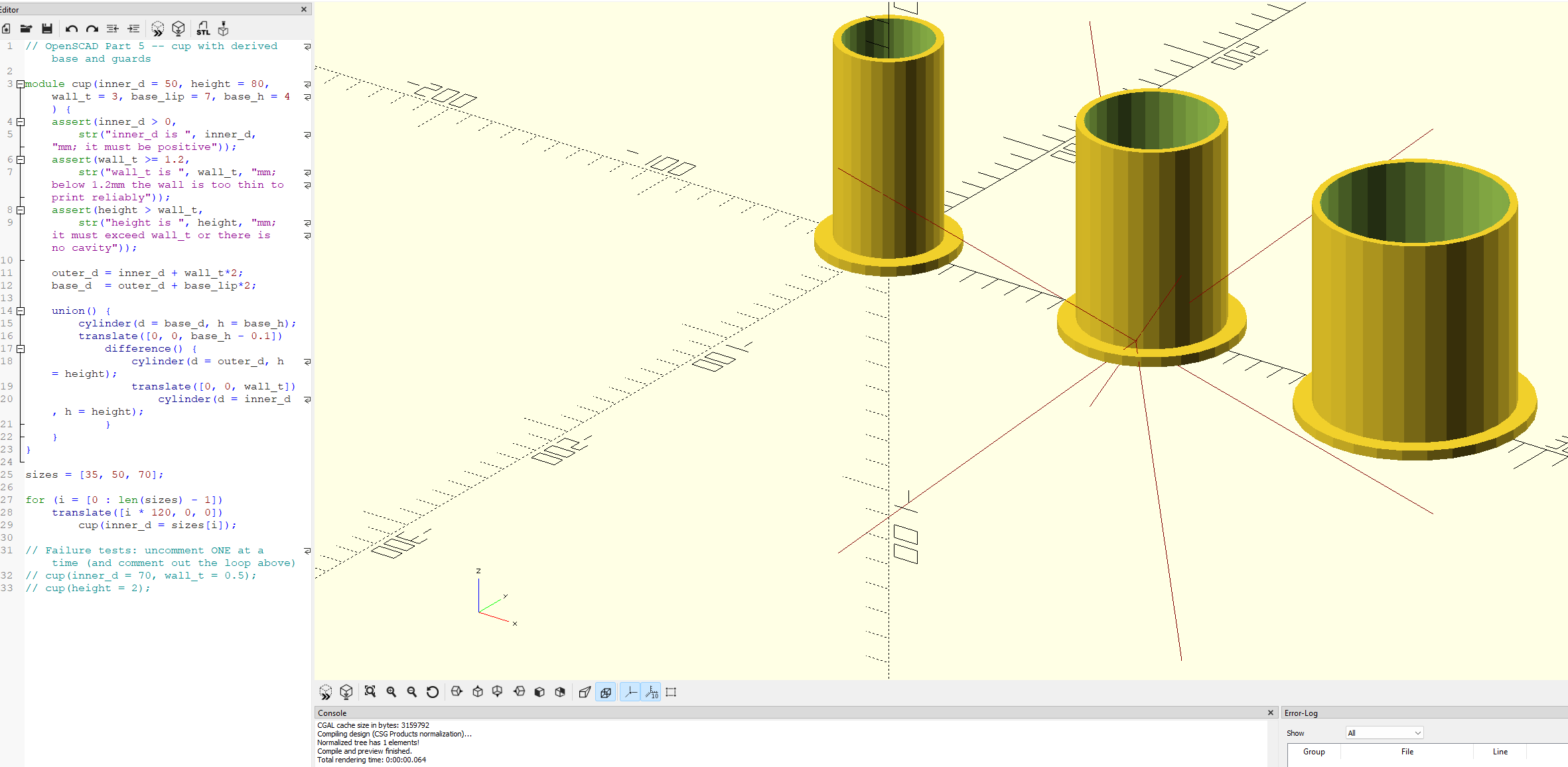
The wrong state has not been caught. It has stopped being possible. There is no value you can pass that produces a base narrower than the body, because the base is never something you pass.
Guard what is left: assert()
Not everything can be derived. The wall thickness is yours to choose, and some choices are simply not printable. A 0.5mm wall will render perfectly well on screen, and on a printer it will be a disappointment. OpenSCAD has no way of knowing that unless you tell it, and the tool for telling it is assert(), which takes a condition and a message:
// OpenSCAD Part 5 -- cup with a derived base

module cup(inner_d = 50, height = 80, wall_t = 3, base_lip = 7, base_h = 4) {
    outer_d = inner_d + wall_t*2;
    base_d  = outer_d + base_lip*2;

    union() {
        cylinder(d = base_d, h = base_h);
        translate([0, 0, base_h - 0.1])
            difference() {
                cylinder(d = outer_d, h = height);
                translate([0, 0, wall_t])
                    cylinder(d = inner_d, h = height);
            }
    }
}

sizes = [35, 50, 70];

for (i = [0 : len(sizes) - 1])
    translate([i * 120, 0, 0])
        cup(inner_d = sizes[i]);
The asserts run when the module is called, before any geometry is built. If every condition holds, nothing happens and you would never know they were there. If one fails, rendering stops, no solid is produced, and the console reports which condition failed along with your message. Call cup(inner_d = 70, wall_t = 0.5) and you get an error naming wall_t and the 0.5mm you gave it, instead of a thin-walled cup that looks fine until it is in your hand.
The str() in the message is worth the extra typing. It joins its arguments into one piece of text, so the message can include the value that broke the rule, not just the name of the rule. A message that says "wall too thin" sends you hunting for which call did it. One that says "wall_t is 0.5mm" does not.
The 1.2mm figure is roughly three passes of a 0.4mm nozzle, which is a sensible floor for many printers and materials, but it is a number about your printer, not about OpenSCAD. Set it to whatever your own machine and filament justify.
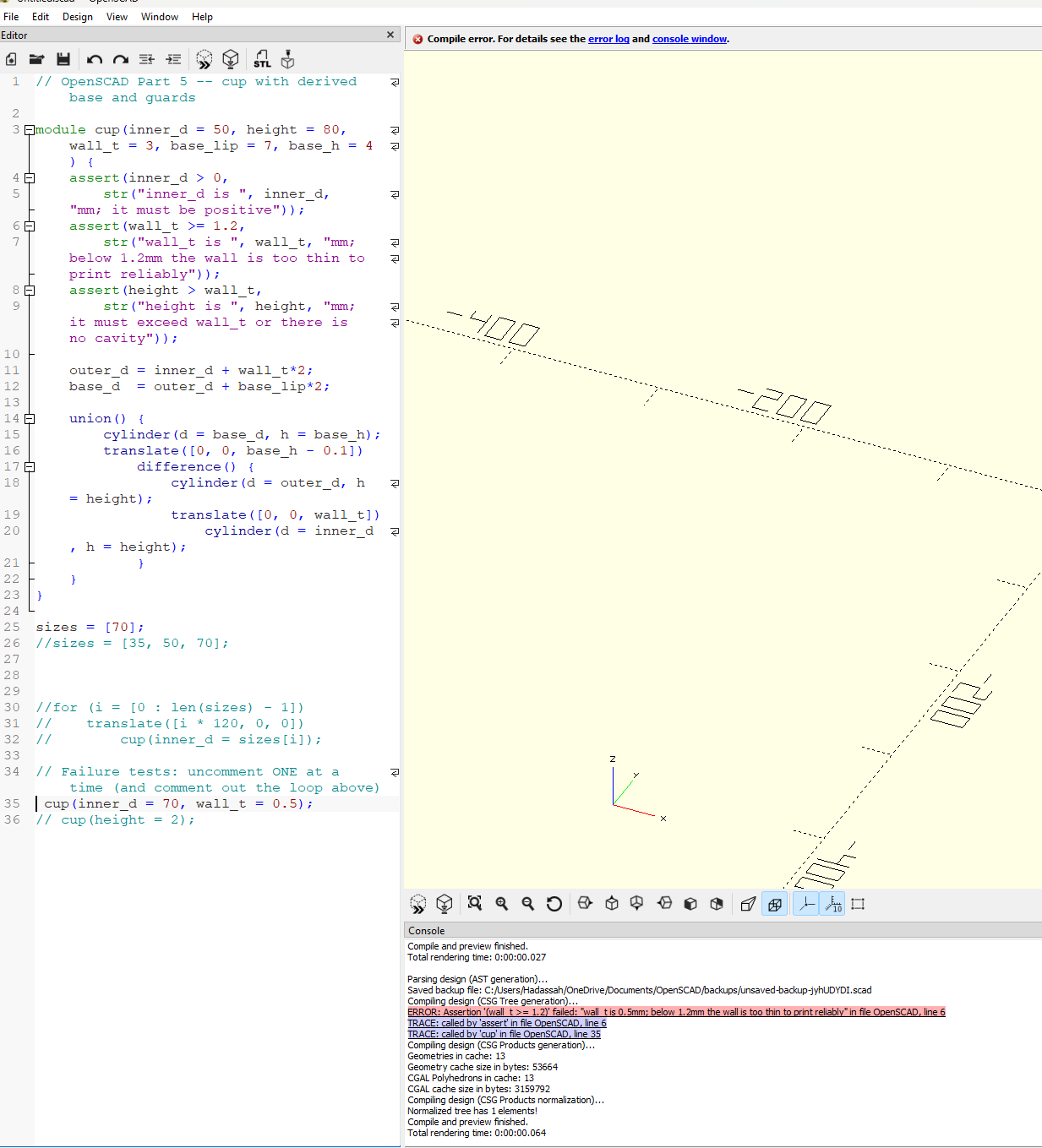
The two TRACE lines beneath the error are worth reading too. They show the assert was reached from inside cup, and which line called it, so a failure deep inside a larger design still points back to the call that supplied the bad number.
What deserves an assert
It is tempting to assert everything, and it backfires. Every assert is a claim you now have to keep true, and a module that refuses a dozen reasonable inputs quickly trains you to comment the asserts out. A better test is to ask which mistakes look plausible when they are wrong. A negative diameter is obviously wrong and will announce itself. A wall that is a little too thin produces a perfectly convincing model of a part that will fail. Those are the ones worth a guard.
The same test decides between the two techniques. If a relationship between two numbers is fixed, as the base and the body were, derive one from the other and the question never comes up. If it is a limit rather than a relationship, a point beyond which the physical world stops cooperating, assert it.
Where the knowledge lives
Part 3 gave a number a name. Part 4 gave a shape a name. This post gave the rule a place to live. Until now, everything that made the cup correct was either in the geometry or in your head, and only one of those survives a six-month gap or a second person opening the file. An assert is the rule written down where the next person to break it will meet it, at the moment they do.
A design is not only the shape it produces. It is also a set of limitations that describe real life requirements.